Export browser AWS credentials to local development environments fast
AWS Credential Bridge, from Skrollmates, simplifies using browser-based AWS authentication for local development by extracting temporary credentials for command-line and SDK workflows. It turns web authentication sessions into credential text formatted for terminals and environment files, reducing the steps required to configure local profiles. The extension is aimed at cloud engineers, DevOps professionals, and developers who maintain multiple AWS accounts and need a faster way to load temporary credentials into local tooling.
How does the extension convert web sign-ins into usable developer tokens?
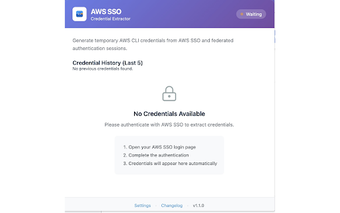
The extension automatically detects AWS IAM Identity Center (SSO) and federated authentication events and generates temporary AWS STS credentials for local use. It produces the three-part credential set (Access Key ID, Secret Access Key, Session Token) formatted for the AWS CLI and environment variables, and exposes a one-click copy action so developers can paste ready-made snippets into terminals or credentials files.
Does it keep credentials private and where are they stored?
Credential handling and storage occur strictly inside the browser; the developer states that no sensitive data is transmitted to external servers. The extension requires permission to access AWS-related domains, and it keeps a local credential history log so recent session tokens are available on the same device without remote storage.
How well does it fit into Chromium browsers and developer workflows?
The interface is lightweight and integrates into Chrome, and it also runs on other Chromium-based browsers such as Edge and Brave. Because it captures authentication events from the browser, the extension needs no complex setup to start producing usable credentials, which reduces manual steps when switching roles or accounts during development sessions.
What are the practical limits for team or enterprise use?
The tool focuses on temporary STS sessions derived from browser SSO and federated flows, so it does not provide cloud-backed credential distribution. It therefore suits per-device, developer-centric workflows rather than centralized credential management. The requirement for AWS-domain permissions may pose policy constraints in locked-down environments or corporate browsers.
Recommendation: a focused, per-device utility for developers who need quick local tokens
The extension is a pragmatic choice for developers and DevOps engineers who repeatedly extract browser-based session credentials for local work; its local-only model fits teams that prefer keeping secrets on-device. Expect a narrow scope tied to browser SSO workflows and per-machine use, rather than a replacement for centralized or multi-device credential distribution systems.